



AGENCY START
A small team with a shared pool of limits
Up to 5
$199/month
+$29 per extra seat / mo
- Listing package
- 15
- AI chat assistant
- 1000
- 3D tour
- 10
- Property PDF presentation
- 50
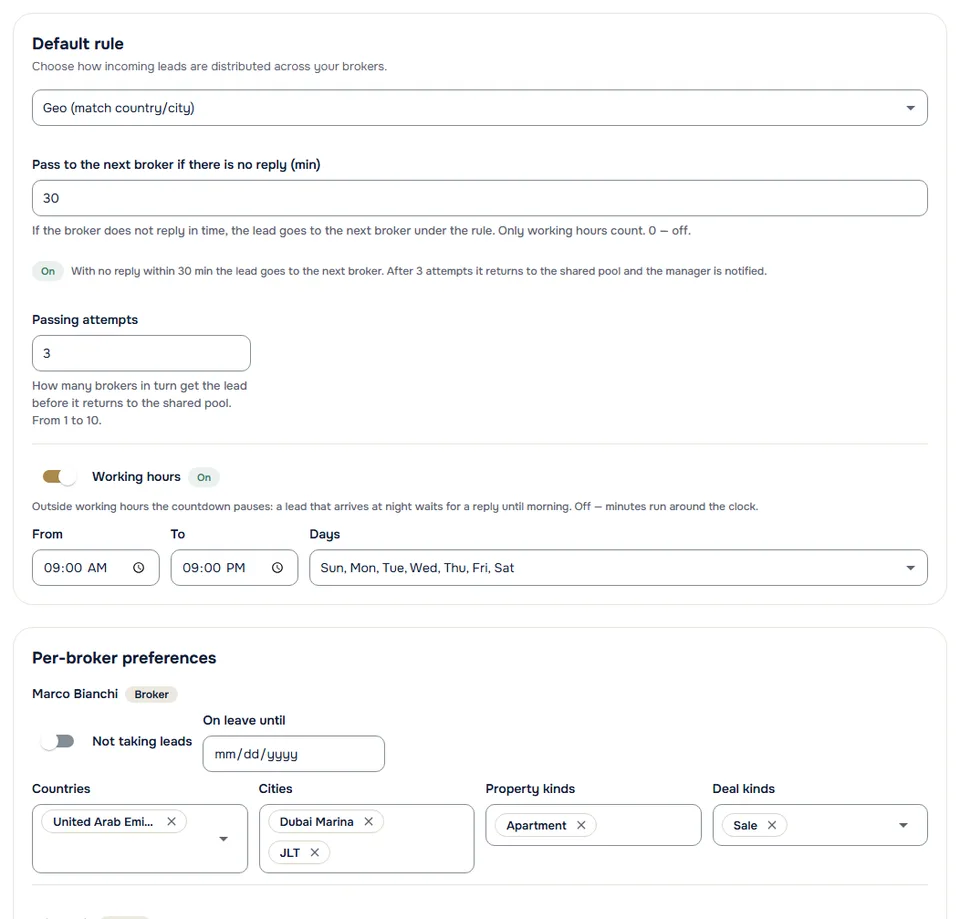
CRM for real estate agencies. A lead goes to a broker by your rule. No reply in time — it moves to the next one. No reply from anyone — it returns to the shared pool and you get a notification.
The agency workspace and CRM are free. A plan from $199 a month gives five seats and a shared pool of AI tools for the team.

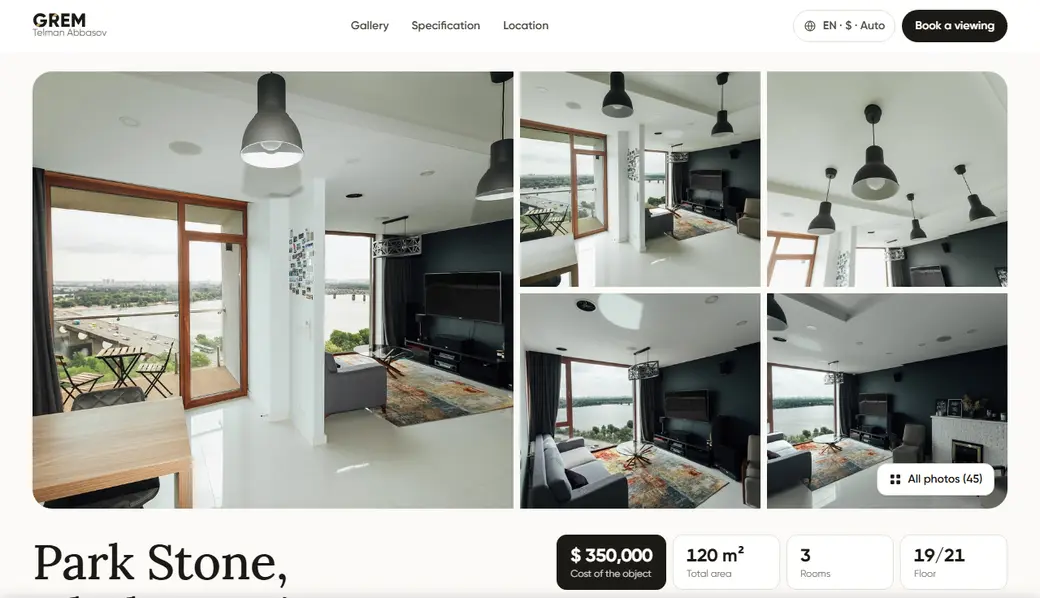
Lead from the agency’s property site, 10:00
Villa with a pool and garden, 240 m²
The buyer left a phone number and a question about the price.
The agency sets the reply deadline: for new agencies it is 30 minutes during working hours. Up to three brokers get the lead in turn. Names are illustrative.
Inbound inquiries from all your sources flow into a shared pool. Claim, transfer, or let routing rules assign them automatically.
GREM AI tools are available to every member of your agency. On a plan the team shares one pool of quotas; beyond it, each action is paid per use from the agency wallet.

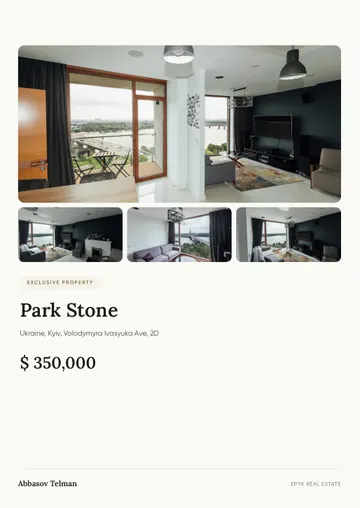
Also in the workspace: Floor plans · 3D tour · API
AI-generated content (valuations, descriptions, images, replies) should be reviewed by a human before use. Outputs are estimates, not professional or legal advice.
We are not going to argue about whose model is smarter. For an agency the difference is not the text — it is whether the result can be handed over, reported on and paid for.
“My brokers already use ChatGPT.”
They do. And the result stays in their private chat: it cannot be passed to another broker, it never appears in a report, and it is not attached to the deal or to the commission.
“Everyone has their own set of services.”
Which is exactly why your listings look like they came from different companies. Here the templates, the tone and the branding are shared, and the manager grants and revokes access.
“Why pay per seat?”
A seat is not a licence to write text. It is a lead from the shared pool, a role with permissions, a line in the commission report and an entry in the audit log. A chatbot gives you none of that.
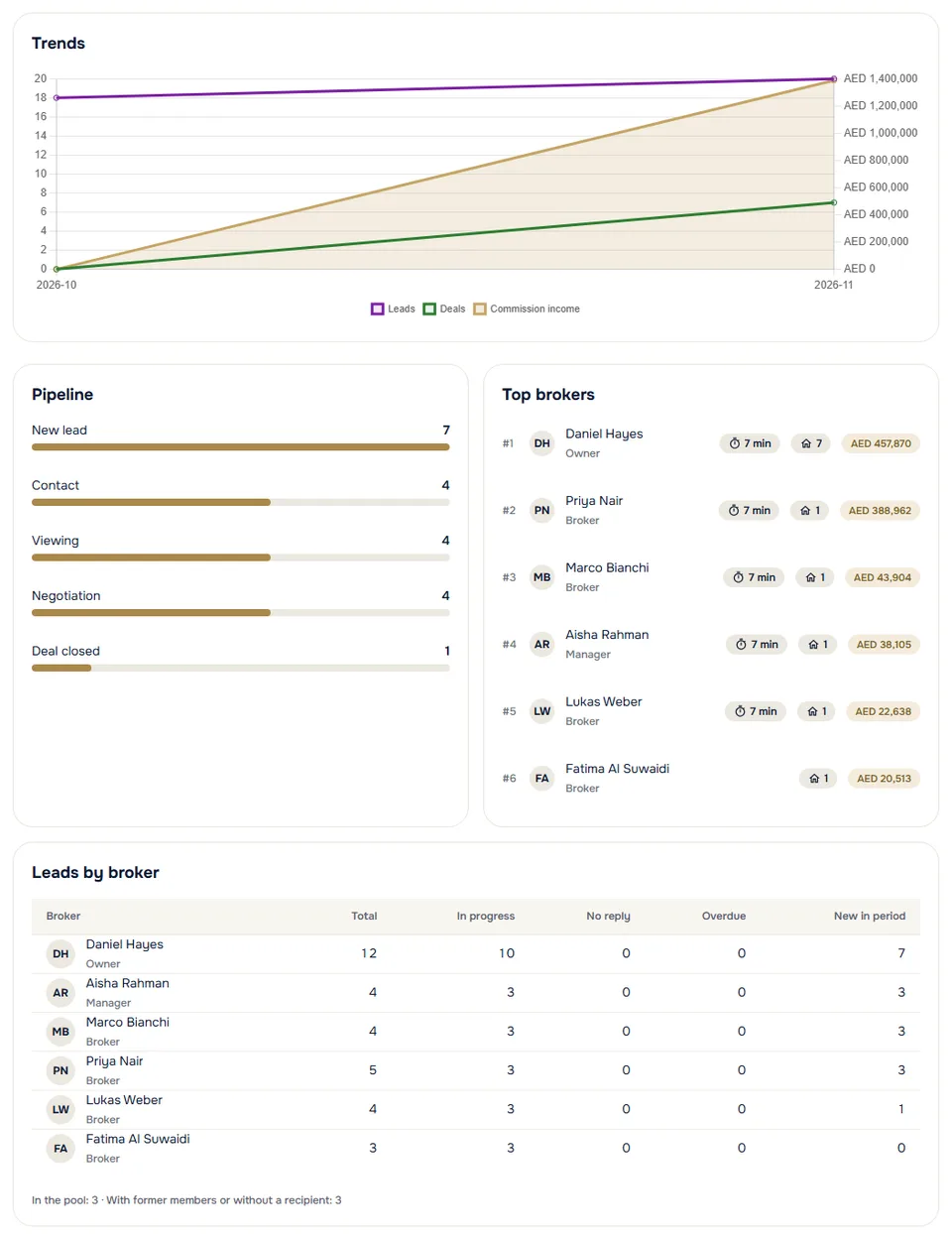
See commission income, pipeline conversion and how each broker is doing — for any period.
Set the agency / broker split once. After a deal closes and the commission reaches GREM, each share is credited to the agency's and the broker's wallet under the agreement — within 7 working days. No spreadsheets.
On the Agency Scale plan your public agency page opens at your own address, with your logo and colour. The workspace and CRM stay on GREM.
Learn moreEvery member, lead and listing action is recorded and reviewable.
Add the agency's licences and registration documents. Once the GREM team has checked them, a mark appears on your public page.
Owner, administrator, manager and broker — each role has its own permissions.
Consent-based analytics, data export and a clear privacy posture.
A plan gives the team a shared monthly pool of AI tools. No setup fees, cancel anytime.
A small team with a shared pool of limits
A growing agency: lead generation and priority support
Large agency, own brand
| Feature | AGENCY START A small team with a shared pool of limits Up to 5 $199/month +$29 per extra seat / mo Choose plan | Best offer AGENCY GROWTH A growing agency: lead generation and priority support Up to 15 $449/month +$22 per extra seat / mo Choose plan | |
|---|---|---|---|
| AI tools | |||
All-inclusive | 15 | 20 | 50 |
AI valuation | 10 | 50 | 150 |
3D tour+$0.40 per point over 12 | 10 | 25 | 75 |
Property landing page | 25 | 75 | 200 |
Property PDF presentation | 50 | 150 | 400 |
AI chat assistant | 1000 | 2500 | up to 10000 |
| Additional system features included | |||
Lead generationNew | |||
Monthly quotas of the plan at pay-per-use prices, and what you save | $470.70 per use$271.70 cheaper (58%) | $1178.80 per use$729.80 cheaper (62%) | $3078.90 per use$2179.90 cheaper (71%) |
Prices in USD · quotas refresh monthly · cancel anytime · balance never expires
A number is how many times a month the plan includes. A grey price means it is not included and is paid per use from the balance. “Up to N” is a monthly ceiling. “—” means the price is being clarified; “✕” means not available on the plan.
Included: CRM system, Smart request, Commission sharing agreement, Community access and a page in the specialists catalog
Free: Link in bio, Flyers and creatives
Do you run a Makler firm in Germany? Go to grem.immo →
Inbound leads land in the agency's shared pool. A member can claim a lead or return it to the pool; a manager can transfer it to a colleague. A routing rule — manual, round-robin, by geography, by specialization or by lead score — is applied as soon as the lead arrives. If the broker does not respond within the set time (30 minutes of working hours for new agencies), the lead goes to the next broker, up to three attempts.
The agency sets a default agency / broker split. After a deal closes and the commission reaches GREM, the agency share and the broker share are credited to their wallets under the agreement — within 7 working days.
Yes. Brokers have a personal workspace they keep forever. Joining an agency is a switchable second context — same login, separate data.
Two ways. By file: the workspace accepts XLSX, CSV, XML and JSON — listings for sale and for rent, developments and leads. By feed: give a link to a feed in XML, YML or CSV and listings update by themselves every 6, 12 or 24 hours; an agency can have up to three feeds. Import does not depend on the plan.
Yes, from your workspace. The plan stays active until the end of the paid period; the workspace, CRM and your data remain — they are free. There is no refund for the unused part of the period.
Sign up and name your agency. Sign-up is free — no card required.
Send email invites, assign roles and set commission splits. Brokers join by the link in the email.
Connect your lead sources, set the routing rule and follow the results in reports.